Radius-Based Scraping
The Radius Scraper module allows users to perform targeted searches within a specific geographical radius (in kilometers) around a central location. This is ideal for gathering business data from suburbs, towns, or city blocks rather than entire cities.
Radius Scraper Interface Overview
The table includes the following columns:
| Column | Description |
|---|---|
| Name | The custom name you give to the scraper (for identification). |
| Search Result | Number of results found in that search. Initially blank until processed. |
| Radius | The size of the circle (in km or miles) from your chosen center point. |
| Status | Displays the progress (e.g., Pending, Scraping, Completed, Failed). |
| Action | Includes options to edit, delete, or view results. |

How to Create a Radius Scraper
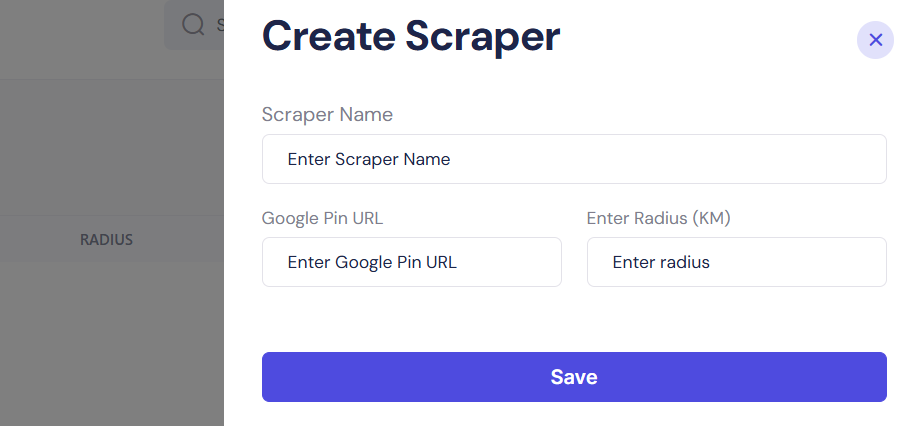
When you click “Create New” from the Radius tab, you’ll see a form where you can configure your geo-targeted scraping campaign using a precise Google Maps pin and a custom radius.
Here’s how to fill out each field:
Scraper Fields Explained
| Field | Description |
|---|---|
| Scraper Name | Enter a name to identify this search. Example: Pizza Shops in 3KM Radius |
| Google Pin URL | Paste a Google Maps link of the central location (e.g., a landmark, business, or address) |
| Enter Radius (KM) | Type in the distance (in kilometers) from the Google Pin location to scan for businesses |
How to Get a Google Pin URL
- Go to Google Maps
- Search for your desired center location (e.g., "Eiffel Tower")
- Right-click on the red pin 📍 and select “What’s here?”
- Copy the URL from your browser's address bar and paste it into the Google Pin URL field
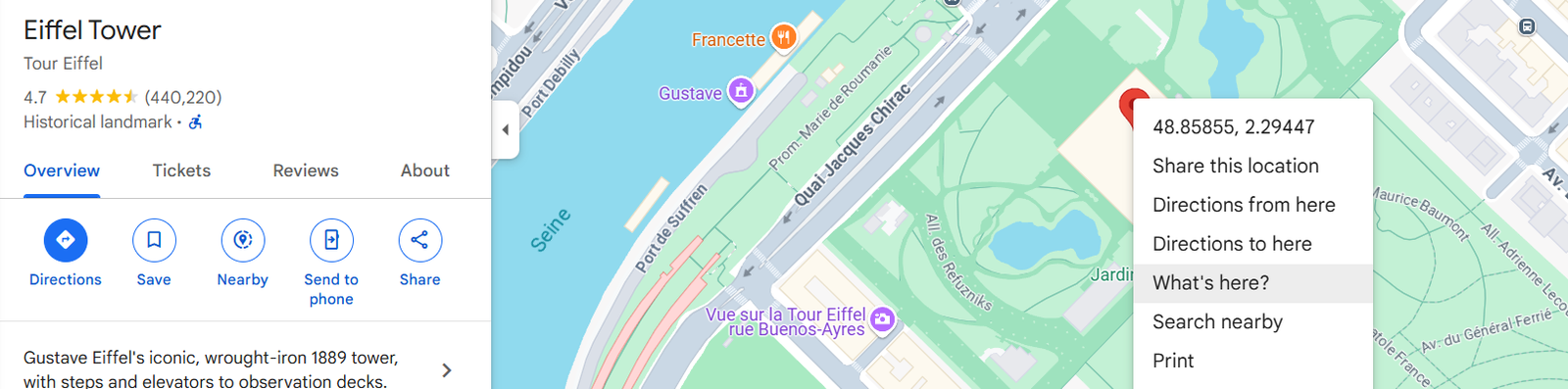
Please note: You can also drop a custom pin anywhere manually and use that as the center.
Example Configuration
| Field | Input Example |
|---|---|
| Scraper Name | Gyms near Times Square |
| Google Pin URL | https://www.google.com/maps/place/Times+Square... |
| Enter Radius | 5 |
Once configured, click the Save button to initiate the scrape. The scraper will start processing, and you’ll see the new task added to the Radius dashboard with status indicators and results once complete.
Best Practices
- Use specific landmarks or business locations for higher accuracy.
- Avoid vague areas — instead of "Downtown", use an exact pin from Google Maps.
- Keep your radius between 1 to 10 KM for tighter targeting. A larger radius may return broader, less focused results.
- Don’t include extra parameters or unnecessary query strings in the Google Pin URL — just the direct map link is enough.